viernes, julio 06, 2012

jueves, julio 05, 2012
miércoles, julio 04, 2012
martes, julio 03, 2012
lunes, julio 02, 2012
viernes, junio 29, 2012
jueves, junio 28, 2012
miércoles, junio 27, 2012
martes, junio 26, 2012
lunes, junio 25, 2012
domingo, junio 24, 2012
viernes, junio 22, 2012
jueves, junio 21, 2012
miércoles, junio 20, 2012
martes, junio 19, 2012
jueves, junio 14, 2012
viernes, mayo 11, 2012
Los Samsung Galaxy Note comienzan a actualizarse a Android 4.0

Android 4.0 se está haciendo esperar para los usuarios de algunos dispositivos. La nueva versión fue anunciada en octubre del año pasado pero todavía hay smartphones que están pendientes de recibir la actualización. No obstante la entrega apodada como Ice Cream Sandwich ya está aterrizando en bastantes dispositivos y cada vez son menos los que quedan en esta especie de lista de espera.
Samsung ya liberó en marzo la actualización para el Samsung Galaxy S2 pero hay un dispositivo de su catálogo que se ha retrasado más de lo previsto, el Samsung Galaxy Note. Este híbrido entre smartphone y tablet también iba a recibir la nueva versión en marzo, pero la compañía anunció que se iba a demorar debido a que estaban preparando un paquete de mejoras llamado Premium Suite. La fecha máxima de salida de esta actualización especial era el 21 de junio, finalmente Samsung se ha adelantado y ya han comenzado la distribución de Android 4.0 Premium Suite en los Galaxy Note.

Hay que tener en cuenta que el proceso de actualización se va produciendo progresivamente en los distintos países programados, por este motivo es muy posible que todavía tarde en llegar a España. De momento sólo unos pocos afortunados han recibido la notificación en sus dispositivos. En GSMarena aseguran que la actualización está disponible en Alemania, lo que indica que el resto de Europa debería recibirla en las próximas semanas. Otro de los factores que influyen en la llegada de las actualizaciones son los operadores de telefonía, cada uno de ellos realiza unos ajustes previos que alargan el proceso unos días más -a veces incluso semanas-. No obstante los usuarios del Samsung Galaxy Note en formato libre no tendrían este problema y podrían tener Android 4.0 más pronto. De momento la descarga sólo puede hacerse vía Kies -el software de sincronización de Samsung- pero en los próximos días se podrá instalar de forma inalámbrica con el sistema conocido como FOTA (Firmware Over The Air). Insistimos en que sólo unos pocos usuarios han recibido la notificación para descargar Android 4.0, lo que no significa que ya esté disponible en España. De todos modos puedes comprobarlo a través de Kies.
Click here to view the embedded video.
El Samsung Galaxy Note es un terminal distinto al resto, su enorme pantalla y el uso del lápiz táctil lo diferencian de un smartphone normal. Samsung es consciente de esto y por eso han decidido incluir funciones exclusivas con la Premium Suite. El objetivo de este paquete de novedades es sacar el máximo partido del lápiz táctil mejorando aplicaciones como S Note. La nueva barra de herramientas de productividad incluye funciones muy interesantes como Shape Match, para que tus dibujos sean más precisos creando líneas y formas geométricas perfectas. Los aficionados al dibujo podrán registrar todo el proceso de creación para poder reproducirlo desde el principio y ver todos los pasos que han seguido. También han mejorado S Memo -que ahora cuenta con un acceso directo en la pantalla de inicio- y han incluido una nueva aplicación llamada My Story para crear álbumes y felicitaciones virtuales y enviarlos a tus amigos.
Leer noticia completa en Los Samsung Galaxy Note comienzan a actualizarse a Android 4.0

martes, mayo 08, 2012


domingo, abril 22, 2012
Minihamburguesas instantáneas en polvo

Tutorial: Samsung Galaxy Note GT-N7000: Guía paso a paso. Android Gingerbread 2.3.6 / Root – Superuser / Custom ROM / Custom Kernel. [Actualizado 08/03/2012] | Mundo Android
domingo, abril 15, 2012
martes, abril 10, 2012
How to Install IceFilms on your jailbroken Apple TV
IceFilms is back and ready to increase the “awesome sauce” of your Apple TV! If you are one of our many fans with XBMC installed on their Apple TVs, you are likely aware of the fact that XBMC has always offered the ability to install third party add-ons. Sadly, this past December, the official XBMC Team took the odd step of closing access to some of XBMC’s most popular add-ons.
Just when it appeared as though these amazing tools would disappear, a new home arrived to connect developers, users, and add-on development. Since moving to XBMCHUB.COM the iceFilms team has been hard at work expanding the abilities and functionalities of it’s add-on and now it is ready, once again, for the prime time.
There are a few things that must be in place prior to installing the latest build:
- Jailbroken Apple TV with XBMC installed (See Existing Guides For Details)
- SSH File Client
- Windows – WinSCP
- MAC – CyberDuck
- The Current IceFilms repo
- A willing mind and a CAN-DO attitude
INSTALLATION
- SSH into your Apple TV by using the following command. Make sure you use the IP address of your Apple TV. This is located in the Network information under the Settings menu on your Home Screen.
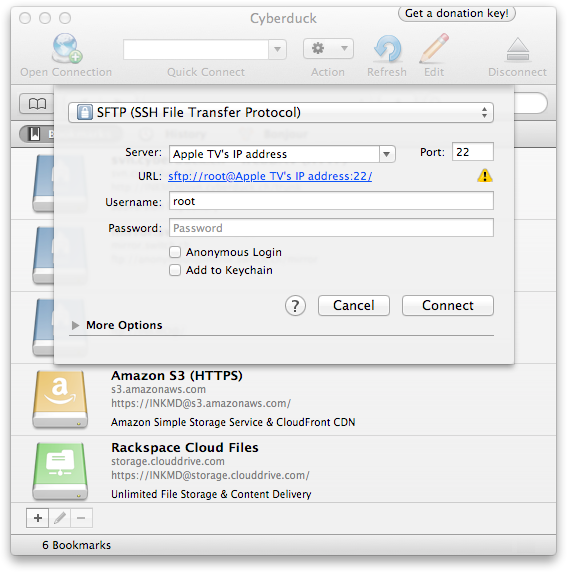
- At the top you will likely see a drop down menu that says “File Transfer Protocol.” Here you will need to select the option that says “SFTP” or “SSH”
- Server: Here you need to enter the IP address of your Apple TV that we located earlier.
- Username: root
- Password: alpine
- Click on the “Connect” button and you will find yourself inside the File System of your Apple TV.
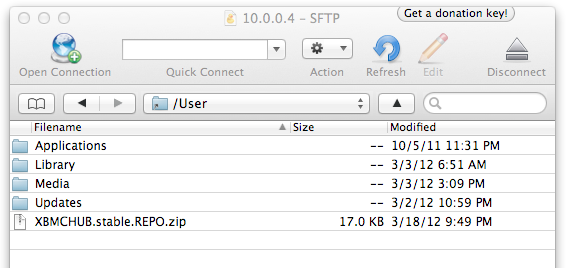
- Next you will need to navigate to the location that XBMC associates as its Home Page. This location is found @ “/User”
- Now we need to find the repo that you download earlier in this tutorial. Once you have located the file, you will need to drag it from your computer into this file location as seen below.
- Open XBMC on your Apple TV and navigate to the System Menu.
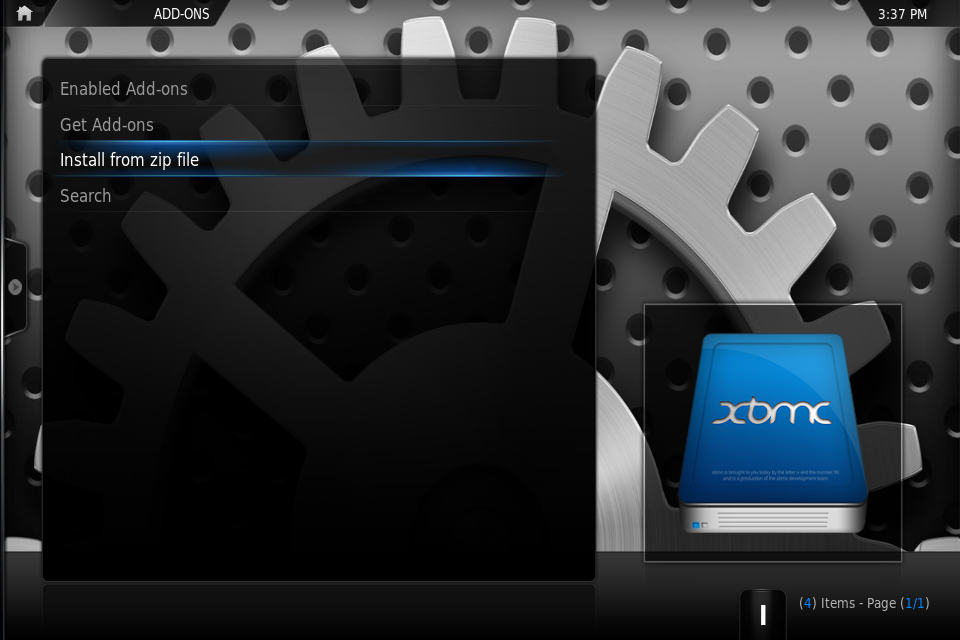
- Select the option titled “Add-ons”. This will open the Add-ons control panel that is built into XBMC.
- Click the option titled “Install From Zip File”
- A File Manager will then pop up. From here you will simply navigate to the “Home Folder”. Here you will find the IceFilms Repo .zip file we transferred over to our Apple TV in step #4.
- Within a few seconds you will see a popup informing you that the IceFilms Repo has been successfully installed.
- Now select the option that says “Get Addons”. This will open up a new window revealing a list of all your installed repositories.
- Simply open the repo labeled “anarchintosh addons”. Once inside select Video Add-ons and then click IceFilms.
- You will now have the option to install the Add-on.
- Now navigate back to your Home Screen… (simply use the MENU button on your Apple TV remote to back out of each screen until at the main menu)
- Select the menu option labeled “VIDEOS”, followed by Video Add-ons. Here you can scroll down until you see IceFilms. Open and enjoy.
If you have problems, or questions, regarding IceFilms simply visit Eldorado, anarchintosh, or any of the other developers of the IceFilms add-on at xbmchub.com.
umOuch (Andrew Brasher) of XBMCHUB

You may also want to read:
XBMC 11.0 Eden for Apple TV 2 5.0 (iOS 5.1) released (+how to install tutorial)
How to jailbreak Apple TV 2 5.0 (iOS 5.1) with Seas0nPass (tethered)
How to install XBMC 11.0 Eden on first-generation Apple TV
XBMC 11.0 Eden for Apple TV – Review
Visit What's on iPhone for the best iPad and iPhone app reviews!
Do you want to feel like a wizard? Check the Kymera wand in Amazon: You can control your Apple TV waving a wand!

miércoles, abril 04, 2012
Técnicas SEO
Guía básica SEO
Access your desktop remotely from your iPhone, iPad, or Android device with Jump Desktop

Have you ever wished that you could access your home desktop computer from your phone or tablet while on the go? Perhaps you had a file on your desktop that you wanted, or maybe you wanted to start a process of some sort like a file download or report-generation, etc. Whatever it may be, if accessing your desktop remotely on an iOS or Android device is what you need, this program is for you.
Jump Desktop requires a Gmail email address and will utilize Google’s servers to connect to your desktop via an RDP or VNC connection. The free version of the Jump Desktop app will let you connect to a single PC, while the paid app allows unlimited PC connections.
Connecting: is fairly easy. It was simple enough to do on my Windows 7 PC by following the wizard-style steps. (It will download and install TightVNC, which it needs).
The Gmail connection: I am unsure why this software requires the use of a Gmail account, but it does. Note that while the Jump Desktop client needs to be logged into this Gmail account, you can simultaneously be logged into a different Gmail account in your browser. My advice: create a brand new Gmail account just for Jump Desktop.
Control via gestures: the interface is very well done, and keyboard and mouse control is very well simulated on the device touchscreen via gestures. See the video below for a summary of these.
 My test of Jump Desktop
: aside from the pleasing novelty of being able to see your desktop screen on your device, I decided to use it to perform a task that a software like this might typically be used for: to open my web email and send a file which is on the hard drive (at home) to myself. I went through the exercise in relative ease (see screenshot to the right).
Performance: will depend on (a) how fast your internet connection is, and (b) how powerful/fast your device is. The wallpaper screen on the desktop went black when I connected with my Android device, presumably to give performance a boost, which may or may not happen . You will experience a lag, and things will not be as responsive as they would be normally, and it can be somewhat annoying. Overall, however, I was quite pleased with the speed, from a purely subjective standpoint.
Desktop-to-Desktop VPN: is possible via the included ‘viewer’ desktop program
What you need to connect: the Jump Desktop client needs to be running on your desktop computer, and needs to be logged into the Gmail account that you used for Jump Desktop. Once you install it, the Jump Desktop desktop client will automatically start with Windows (which you may or may not want) and will consume a relatively small 15 megs of memory.
The verdict: an excellent software. The free version is restricted to connecting to a single desktop computer, which seems fair. The interface and performance both deserve high marks. If getting into your desktop remotely from your phone or tablet is what you need, Jump Desktop is a great solution.
The one thing I do not like is the need to use a gmail account, which I believe is not the case with other software that can do this (e.g. TeamViewer). In any case I suggest that you create a new Gmail account for Jump Desktop purposes if you are going to use it.
I tested this software on Android, and Jump Desktop bills itself as the ‘fastest RDP/VNC client for Android’. As a fan of TeamViewer on Windows, I would be very interested to see how it compares TeamViewer Android app, but that comparison will have to be made in another post.
Compatibility: Windows, Mac, iOS (iPhone, iPad), Android
[Thanks go to reader Panzer for tipping us off about this program].
Go to the download page to get the desktop client. Ger the Android app here; iOS app here.

martes, abril 03, 2012
Superfocus Lenses makes bifocals seem even more terrible than normal

Bifocals are horrendously obnoxious. These glasses have two different and very specific optical powers that can help people who have myopis, hyperopis, presbyopia, and/or astigmatism. Seeing as your field of vision has two different parts [...]
167 words | permalink | No comments | digg this


jueves, marzo 15, 2012
La reforma laboral, la huelga y otras chapuzas

jueves, marzo 08, 2012
Comparamos el nuevo iPad con tres de sus mayores rivales

Aunque muchos esperábamos una actualización muy discreta, la renovación del iPad ha sido una demostración de poder: pantalla Retina, GPU de cuatro núcleos, acceso LTE… No hemos podido evitarlo, había que hacer una comparativa de especificaciones entre el nuevo iPad y sus tres mayores rivales. ¿Y a quiénes ponemos al otro lado del ring?
El primer gran rival del iPad 2012 es sin duda el iPad 2, que ahora está a la venta por sólo 400 euros. Del MWC 2012 rescatamos los otros dos: el Samsung Galaxy Tab 2 10.1 (por supuesto, no podía faltar Samsung), y el ASUS Transformer Infinity 700 (que destacó en hardware y porque el concepto “transformer” es muy interesante). Podéis pinchar en la imagen para ver la tabla a tamaño completo.

 |  |


martes, octubre 25, 2011
domingo, julio 03, 2011
http://www.elotrolado.net/hilo_problemas-con-mini-mac_1630377
jueves, junio 16, 2011
tutor asp i altres
http://www.asptutor.com/foros
http://www.w3schools.com/
http://www.w3schools.com/TAGS/tag_div.asp
.
jueves, junio 09, 2011
sábado, junio 04, 2011
10 things you can do when Windows XP won't boot By Greg Shultz
.
http://vip.asus.com/forum/view.aspx?id=20070215223109668&board_id=1&model=P5B+Deluxe%2FWiFi-AP&SLanguage=en-us&page=1
.
http://www.softpedia.com/dyn-postdownload.php?p=81781&t=4&i=1
.
http://vip.asus.com/forum/view.aspx?board_id=20&model=Eee+PC+1005HA&id=20091019013723218&page=1&SLanguage=en-us
.
http://techbaros.com/what-is-eee-pc-1005-ha-support-dvd-for.html
.
http://www.chw.net/foro/guias-f79/130784-instalando-windows-xp-desde-un-dispositivo-usb-instalacion-de-win-xp-en-el-eeepc.html
.
http://www.pebuilder.de/downloads.php
.
http://reboot.pro/forum/71/
.
http://www.pcstats.com/articleview.cfm?articleid=418&page=3
.
sábado, mayo 28, 2011
domingo, mayo 22, 2011
Drupal Document Management System
http://drupal.org/project/filedepot
http://stackoverflow.com/questions/3112013/document-management-for-drupal-6
http://wiki.knowledgetree.org/KnowledgeTree_Drupal_Module
http://www.vmtllc.com/blog/razzaque/2008/05/18/drupal-intranetextranet-solution
http://wwwhatsnew.com/2009/07/15/open-atrium-una-intranet-gratis-basada-en-drupal/
.
martes, mayo 03, 2011
miércoles, abril 20, 2011
lunes, abril 18, 2011
microsoft-discos-virtuales-gratuitos
jueves, abril 14, 2011
lunes, abril 11, 2011
domingo, marzo 20, 2011
viernes, marzo 18, 2011
Facebook Impressions for Pages
lunes, marzo 14, 2011
viernes, marzo 11, 2011
HOWTO: Windows XP in both VM and native
http://forums.virtualbox.org/viewtopic.php?t=9697
.....................
Howto: Boot existing Ubuntu Partition using Virtualbox inside Windows
http://www.neowin.net/forum/topic/784138-howto-boot-existing-ubuntu-partition-using-virtualbox-inside-windows/
........................
........................
http://www.neowin.net/forum/topic/784138-howto-boot-existing-ubuntu-partition-using-virtualbox-inside-windows/
........................
martes, marzo 08, 2011
miércoles, marzo 02, 2011
http://www.vandomburg.net/installing-windows-xp-from-usb/
sábado, febrero 19, 2011
awkwardTV Wiki
awkwardTV Wiki
As you probably know, Apple TV is a set-top box manufactured by Apple
miércoles, febrero 09, 2011
viernes, febrero 04, 2011
martes, febrero 01, 2011
martes, enero 18, 2011
viernes, enero 14, 2011
lunes, enero 10, 2011
sábado, enero 08, 2011
Getting Rid of Duplicate Images on your Computer
You can have duplicate images on your computer for mostly three reasons:
#1. You transferred a set of pictures from the digital camera to your computer but did not erase them from the camera. Thus when you re-connected the camera, they got copied again to your hard drive but in a different location.
#2. You made some minor edits to a picture – let’s say you cropped it or fixed the rotation – and your image editing program saved the edited image as well as the original picture.
#3. You may also have images on your computer that are “loose duplicates” of each other. That means the images are mostly identical except for very minor variations – often happens when you capture multiple frames in quick succession.
1. Deleting Duplicate Images
If you are only looking to find and remove images that are “exact” duplicates of each other, Google’s Picasa desktop software could be a good solution. Just import all your picture folders into Picasa and then choose Tools –> Experimental –> Show Duplicate Files to see a list of potential duplicates.
While removing duplicate images with Picasa, please remember that the software will list all copies that are found of an image including the original one. You therefore need to keep one of these copies and delete the rest as demonstrated in the above screencast.
Alternatively, create a separate folder that’s not included in Picasa and move all the potential duplicate photographs to that folder instead of deleting them.
Related reading: How to Backup your Photos
Now Picasa is a good solution for deleting identical duplicates but your disk may also be storing have pictures that look similar visually but may differ as far as pixels or bytes are considered. Such files won’t be recognized by Picasa as duplicates but VisiPic, a tiny utility for Windows, can come really handy here.
2. Deleting Similar Images
To get started, launch the program and click File –> Add Folder to add folder(s) that you want to scan for duplicates. Then slide the Filter to somewhere between “Strict” and “Basic” so that program may group images that are similar or only slightly different. Hit play to begin scanning for duplicates.

To eliminate the duplicates, just move your mouse over the thumbnails and left-click the pictures you want to delete. They’ll be marked with a recycle bin icon and you may then either choose “Delete” or even “Move” to transfer them to a separate folder.
The tool is also smart enough to auto-select images for deletion that either have lower resolution or lower file-size than the original image.
Also see: Free-up Disk Space on your Computer


This article, titled Getting Rid of Duplicate Images on your Computer, was originally published at Digital Inspiration under Images, Software.
 "
"
viernes, enero 07, 2011
miércoles, enero 05, 2011
domingo, enero 02, 2011
Point domain name to the web server - change the name server information to the I.P. of the web server
How do I point my domain to my Brinkster account?
*Note: If your domain was registered through Brinkster with your account then the domain will automatically point to that account and no further steps are needed
If the domain was registered with a different Brinkster account or a different registrar then you will need to have the domain added to your account. You can do this by listing your domain as an existing domain during the signup of your account or by contacting support via live chat.
If your domain was registered by someone other than Brinkster, the domain will need to be pointed to our name servers. Please view the following link for instructions on how to do this:
http://kb.brinkster.com/Kb.asp?kb=110568
miércoles, diciembre 29, 2010
http://www.plarenovat2010.cat/
http://premsa.gencat.cat/pres_fsvp/AppJava/notapremsavw/detall.do?id=61307&idioma=0&WT.rss_a=pla_renova_t_de_finestres&WT.rss_f=Informacio_i_serveis_de_la_Generalitat_de_Catalunya&WT.rss_ev=c
L'ICAEN inicia el Pla Renova't de Finestres, dotat amb 8,5 milions d'euros
viernes, diciembre 17, 2010
https://www.google.com/accounts/DisplayUnlockCaptcha
http://www.gbridge.com/forum/showthread.php?t=539
..............,-,-,-,-,-,-,-,-,-,